Can My VIN Tell Me My Paint Code Quickly and Easily
Can my VIN tell me my paint code? The short answer is yes, in many cases. Your vehicle identification number holds valuable data about your car’s factory color. This guide shows you exactly how to decode your VIN and find your paint code quickly. You will learn where to look, which tools to use, and what to do when the VIN does not give you the answer.
You have been searching for your car’s paint code, and someone told you that your VIN might hold the answer. But can my VIN tell me my paint code? The question is more common than you might think, and the answer is not always straightforward. Your vehicle identification number is a powerful string of characters that contains a wealth of information about your car. From the manufacturer to the engine type, your VIN reveals details that go far beyond a simple serial number. However, whether it includes your exact paint code depends on several factors. In this guide, we will walk you through everything you need to know about decoding your VIN for paint information. You will learn the methods that work, the tools you can use, and the alternatives when the VIN does not give you what you need.
Finding your car’s factory color code matters for many reasons. Maybe you need touch up paint for a small scratch. Perhaps you are planning a full respray and want an exact match. Or maybe you are buying a used car and want to verify the original color. Whatever your reason, knowing your paint code saves time and money. It also helps you avoid the frustration of guessing or ordering the wrong shade. So let us dive in and explore how your VIN connects to your vehicle’s paint code.
Key Takeaways
- Your VIN can reveal your paint code: The vehicle identification number contains factory color data in many cases.
- VIN decoders make the process easy: Free online tools can quickly look up your paint code from your VIN.
- Not all VINs include paint info: Some manufacturers do not encode paint codes in the VIN structure.
- Alternative methods work well: Door jamb labels, dealer records, and manufacturer websites offer other ways to find your code.
- Matching paint is simpler with the right code: Once you have your OEM paint code, touch up and repainting becomes much easier.
- Always double-check your results: Cross-reference your paint code with physical labels on your vehicle for accuracy.
📑 Table of Contents
- What Is a VIN and Why Does It Matter for Paint Codes?
- Can My VIN Tell Me My Paint Code? Here Is How It Works
- How to Use a VIN Decoder for Paint Code Lookup
- Common Challenges When Trying to Decode Your Paint Code
- Alternative Ways to Find Your Car Paint Code
- Tips for Matching and Touching Up Your Car Paint
- Conclusion
What Is a VIN and Why Does It Matter for Paint Codes?
A vehicle identification number is a unique code assigned to every car. Think of it as your car’s fingerprint. No two vehicles share the same VIN. This 17-character code is stamped in many places on your car and appears on your title and registration documents. When you ask can my VIN tell me my paint code, you are really asking what information is hidden inside those 17 characters.
The VIN follows a standardized format set by the International Organization for Standardization. Each section of the code carries specific meaning. The first three characters identify the world manufacturer identifier. Characters four through eight describe the vehicle attributes like brand, engine type, and body style. The ninth character is a check digit. The tenth character tells you the model year. The eleventh character identifies the assembly plant. The last six characters form the sequential serial number.
Understanding this structure helps you see why some VINs contain paint code data and others do not. The VIN was originally designed for vehicle tracking and identification, not for cosmetic details. However, many manufacturers have expanded the VIN-linked databases to include factory color codes and trim information. This makes the VIN a valuable starting point for your paint code search.
Understanding the VIN Structure
Let us break down the VIN structure a bit more. The first character tells you the country of origin. The second character identifies the manufacturer. The third character combined with the first two indicates the vehicle type or manufacturing division. Characters four through eight describe specific features like the model line, body style, engine type, and restraint system. This section is where you might find clues about the body color code in some manufacturer databases.
The tenth character is especially useful because it tells you the model year. This matters because paint formulas change over time. A car made in 2015 might have a different paint code than the same model made in 2020, even if the color name is the same. When you decode your VIN, always pay attention to the model year character to ensure you get the correct paint code for your specific vehicle.
Can My VIN Tell Me My Paint Code? Here Is How It Works
When can my VIN tell me my paint code, the process usually involves using a VIN decoder. A VIN decoder is an online tool or service that breaks down your VIN and extracts the data stored within it. These tools read each character of your VIN and translate it into readable information. Some decoders go deeper than others and can pull factory color codes from connected manufacturer databases.
The process is simple. You take your 17-character VIN and enter it into a decoder tool. The tool then parses the code and displays results. These results may include the manufacturer, model year, assembly plant, and in some cases, the paint code. However, the depth of information depends on the decoder you use and the manufacturer’s data sharing practices.
Step-by-Step: Using Your VIN to Find the Paint Code
Follow these steps to try finding your paint code through your VIN:
- Locate your VIN. You can find it on the dashboard near the windshield, on the driver’s side door jamb, or on your vehicle title and registration.
- Choose a reliable VIN decoder. Look for tools that specifically mention paint code or color code lookup in their feature list.
- Enter your VIN into the decoder. Make sure you type all 17 characters correctly without any spaces or dashes.
- Review the results. Look for fields labeled paint code, color code, or factory color. Not all decoders will display this information.
- Cross-reference with your vehicle. Check the paint code on your door jamb label to confirm the decoder’s result matches.
This method works well for many vehicles, but it is not foolproof. If the decoder does not return a paint code, do not worry. There are other reliable methods we will cover below.
Where to Find the Paint Code on Your Vehicle
Even when your VIN does not directly reveal the paint code, your car itself holds the answer. Most manufacturers place a label or sticker in a specific location that lists the paint code alongside other important vehicle information.
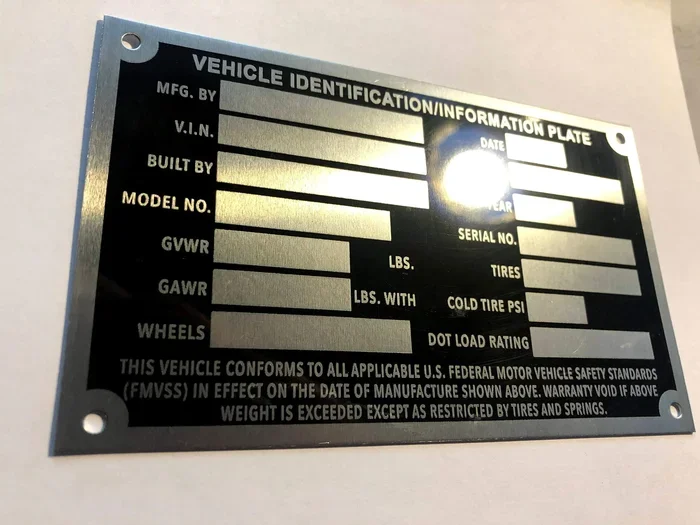
The most common location is the driver’s side door jamb. Open your driver’s door and look for a sticker or metal plate on the door frame. This label typically includes the paint code, the trim code, the model number, and the manufacturing date. The paint code is often a two-to-three digit alphanumeric code that corresponds to a specific factory color.
Other possible locations include:
- The glove box interior
- The spare tire well
- The underhood fuse box area
- The rear wheel well liner
If you find this label, you now have your paint code without needing the VIN at all. However, if the label is missing or faded, the VIN becomes your next best option. Always try the door jamb first when searching for your paint code location, as it is the most reliable source.
How to Use a VIN Decoder for Paint Code Lookup
VIN decoders are the most popular way to answer the question can my VIN tell me my paint code. These tools range from free websites to paid services with detailed reports. The free decoders usually provide basic vehicle information. The paid services often include deeper data like factory paint codes and trim specifications.
Here are some popular VIN decoder options you can try:
- National Insurance Crime Bureau (NICB) VINCheck: A free tool that provides basic VIN decoding. It may not include paint codes but is a good starting point for vehicle color identification.
- Decoder.net: Offers free VIN decoding with varying levels of detail depending on the vehicle make and model.
- AutoCheck by Experian: A paid service that provides comprehensive vehicle history and detailed specifications including color data.
- CarVertical: Provides VIN reports that include color and paint code information for many manufacturers.
- Manufacturer-specific portals: Brands like Ford, GM, and Toyota offer their own VIN lookup tools on their official websites.
What to Look for in a Good VIN Decoder
Not all VIN decoders are created equal. When choosing a tool for paint code lookup, look for these features:
- Support for your specific vehicle manufacturer
- Clear labeling of paint code or color code in the results
- Access to manufacturer databases for accurate factory data
- Positive user reviews and a track record of reliable results
- No hidden fees for accessing basic paint code information
A good decoder saves you time and prevents you from ordering the wrong paint. Always verify the results with a physical label on your vehicle whenever possible. The best approach combines a VIN decoder with a physical check of your car’s labels for complete accuracy.
Common Challenges When Trying to Decode Your Paint Code
Even with the right approach, you may run into obstacles when trying to find your paint code through your VIN. Understanding these challenges helps you stay patient and find the right solution quickly.
Why Some VINs Do Not Include Paint Information
The VIN system was designed to identify vehicles, not to catalog every cosmetic detail. Paint codes are considered supplementary data that some manufacturers choose to include in their VIN-linked databases and others do not. This means that even if your VIN is valid and correct, the decoder might not return paint information simply because the manufacturer does not share that data through the VIN structure.
Additionally, older vehicles present a challenge. VIN standardization became mandatory in 1981 for all vehicles sold in the United States. Cars made before 1981 may have shorter VINs or no VIN at all in some cases. For these older models, the VIN is less likely to contain paint code information regardless of the decoder you use. If you are working with a classic car, focus on the door jamb label or manufacturer records instead.
When the VIN Was Changed or Reassigned
In some cases, a vehicle may have a VIN that has been changed or reassigned. This can happen after a major rebuild, a salvage title, or in cases of fraud. When the VIN does not match the original vehicle records, the decoder may return incorrect or incomplete data. If you suspect your VIN has been altered, you should verify it with your local DMV or the manufacturer directly. A mismatched VIN can also cause problems with paint code lookups and automotive paint matching.
Alternative Ways to Find Your Car Paint Code
When your VIN does not provide the paint code, you still have several reliable alternatives. These methods work well and often give you faster results than decoding a VIN. The automotive paint code lookup process is not limited to just the VIN number.
Checking the Door Jamb Label
The door jamb label remains the most reliable source for your factory paint code. This label is placed by the manufacturer during production and contains the exact color code used on your vehicle. It includes the paint code, the trim code, and the model identification number. Even if your VIN decoder fails, this label almost always has the information you need.
To read the label effectively, look for the two-digit or three-digit code next to the word paint or color. Write this code down exactly as it appears. Use it when ordering touch up paint or requesting a paint match at an auto body shop. The door jamb label is your best friend when it comes to vehicle color identification.
Contacting the Manufacturer Directly
If you cannot find the door jamb label and your VIN decoder comes up empty, contact the manufacturer. Most automakers have customer service departments that can look up your vehicle details using your VIN. Provide them with your full VIN and ask specifically for the factory paint code or color code.
You can also visit a local dealership with your VIN. The service department can access the manufacturer’s internal database and pull your vehicle’s original specifications, including the paint code. This method works for both current and older model vehicles. Dealerships have access to the same systems that dealerships use for body shop repairs and automotive paint matching.
Using Online Color Code Finder Tools
Several websites specialize in color code lookups that go beyond basic VIN decoding. These tools let you search by make, model, and year to find the correct paint code. While they do not use the VIN directly, they provide accurate results for most vehicles. Popular options include color code finder websites that compile data from multiple manufacturers.
These tools are especially helpful when you are trying to match a paint color for a classic car or a vehicle with a replaced paint code label. They often include paint code charts and cross-reference tables that make the process smoother. A good color code finder can save you hours of searching and guessing.
Tips for Matching and Touching Up Your Car Paint
Once you have your paint code, the next step is using it effectively. Whether you are touching up a small scratch or planning a full repaint, having the correct OEM paint code makes all the difference. The right paint code ensures that your car paint matching is as close to the original factory finish as possible.
Using the Paint Code for Touch Up Paint
Touch up paint is one of the most practical uses for your paint code. With the correct code, you can order a small bottle of factory-matched paint from the dealer or an aftermarket supplier. Provide the paint code exactly as it appears on your vehicle label. This ensures you receive the factory-matched color that blends seamlessly with your existing paint. Touch up paint is perfect for small scratches and chips that need a quick fix.
For the best results, clean the area thoroughly before applying touch up paint. Use a fine brush or a touch up pen for precision. Allow the paint to dry completely before applying a clear coat if recommended by the manufacturer. Proper preparation makes a huge difference in how the repair looks over time.
Working with Auto Body Shops
When you visit an auto body shop for a larger repair or a full respray, provide them with your paint code upfront. This ensures they mix the correct paint formula from the start. A good shop will use your OEM paint code to create a precise match that blends seamlessly with the rest of your vehicle.
Keep in mind that paint fades and shifts slightly over time due to sun exposure and weather. Even with the exact factory paint code, a professional color match may require slight adjustments during the blending process. This is normal and expected in automotive paint matching. Experienced body shops know how to handle these subtle variations.
Understanding Paint Formulas and Codes
Your paint code corresponds to a specific paint formula created by the manufacturer. This formula includes the base color, the metallic flakes if any, and the clear coat specifications. When you share your paint code with a supplier or body shop, they use it to pull the exact formula from their system.
Some vehicles use tri-coat paint systems that involve three layers: a base color, a mid-layer with metallic or pearl effects, and a clear coat. The paint code identifies the entire system. Knowing this helps you understand why matching paint can be complex for certain colors, especially metallics and pearls. Always trust the OEM paint code over a generic color name when ordering paint for any repair or restoration project.
Conclusion
So, can my VIN tell me my paint code? The answer is yes, but with some important caveats. Your VIN is a powerful tool that can reveal your vehicle’s factory paint code in many cases. However, not all manufacturers encode this information in the VIN, and some decoders are more effective than others. When the VIN does not work, you have reliable alternatives like the door jamb label, manufacturer lookup, and online color code finders.
Taking the time to find your correct paint code pays off in the long run. It ensures accurate paint matching for repairs, touch ups, and custom work. It also helps you maintain your vehicle’s value and appearance. Whether you are a DIY enthusiast or working with a professional, knowing your paint code gives you confidence and saves you from costly mistakes.
Start by trying a VIN decoder with your 17-character code. If that does not work, check your door jamb label or contact your manufacturer. With the right approach, you will find your paint code quickly and easily. Your car deserves the right color, and now you have the knowledge to make it happen.
Frequently Asked Questions
Can I find my paint code using just my VIN number online?
Yes, in many cases you can. Several free VIN decoder websites allow you to enter your VIN and retrieve paint code information. However, the results depend on your vehicle manufacturer and whether they share paint data through the VIN system. If the decoder does not show a paint code, try checking your door jamb label or contacting the manufacturer directly for the correct factory color code.
What if my VIN decoder does not show a paint code?
This is more common than you might think. Not all manufacturers include paint codes in their VIN-linked databases. When the decoder comes up empty, check the label inside your driver’s door jamb for the paint code. You can also contact your dealership with your VIN and ask them to look up the factory color code from their internal system. There are always backup options available.
Is the paint code the same as the color name on my car?
No, they are different. The color name is a marketing term used by the manufacturer, while the paint code is a specific alphanumeric identifier tied to the exact paint formula. Two cars can share the same color name but have different paint codes if they were made in different years or at different factories. Always use the paint code for accurate car paint matching.
Can I use my paint code to order touch up paint?
Absolutely. Once you have your paint code, you can order touch up paint from your dealer or an aftermarket supplier. Provide the code exactly as it appears on your vehicle label. This ensures you receive the factory-matched color that blends seamlessly with your existing paint. Touch up paint is perfect for small scratches and chips that need a quick and easy fix.
Do older cars have different paint code lookup methods?
Yes, older vehicles can be trickier. VIN standardization began in 1981, so cars from before that era may not have a standard 17-character VIN. For older vehicles, the door jamb label and manufacturer records are often the best sources. Some classic car parts suppliers also maintain extensive paint code databases for vintage models that go beyond basic VIN decoding.
How accurate are online paint code lookup tools?
Most reputable online tools provide accurate results when the manufacturer shares data through the VIN system. However, accuracy varies between tools and manufacturers. Always cross-reference your results with a physical label on your vehicle. If you are unsure, contact your dealership for confirmation. Using the correct OEM paint code is essential for a proper color match and long-lasting repair results.
=== KEY TAKEAWAYS ===
Key Takeaways
- Your VIN can reveal your paint code: The vehicle identification number contains factory color data in many cases.
- VIN decoders make the process easy: Free online tools can quickly look up your paint code from your VIN.
- Not all VINs include paint info: Some manufacturers do not encode paint codes in the VIN structure.
- Alternative methods work well: Door jamb labels, dealer records, and manufacturer websites offer other ways to find your code.
- Matching paint is simpler with the right code: Once you have your OEM paint code, touch up and repainting becomes much easier.
- Always double-check your results: Cross-reference your paint code with physical labels on your vehicle for accuracy.