Can I Connect My iPhone to CarPlay Wirelessly and Easily
Yes, you can connect your iPhone to CarPlay wirelessly if your car and phone support it. Wireless CarPlay lets you ditch the cable and enjoy music, maps, and messages hands-free. This guide covers setup, compatibility, troubleshooting, and quick tips to make your wireless CarPlay connection smooth and reliable.
Can I Connect My iPhone to CarPlay Wirelessly? The short answer is yes. If you own a newer iPhone and a compatible car, you can enjoy all the benefits of Apple CarPlay without plugging in a single cable. Wireless CarPlay has changed the way we interact with our vehicles. It brings maps, music, phone calls, and messages right to your car screen. No more fumbling with cords. No more disconnections at the worst possible moments.
This guide walks you through everything you need to know about wireless CarPlay. We cover how it works, which cars support it, how to set it up, and what to do when things go wrong. Whether you are a tech-savvy driver or someone who just wants a simpler setup, this article has you covered. Let us dive in and make your driving experience smoother.
Key Takeaways
- Wireless CarPlay is available: Many newer cars and iPhones support it without a cable.
- Check compatibility first: Both your car infotainment system and iPhone must support wireless CarPlay.
- Setup is simple: Go to Settings, pair via Bluetooth, and follow on-screen prompts.
- Common issues have easy fixes: Restarting devices, updating software, and resetting network settings often solve problems.
- A wireless adapter can help: Older cars can get wireless CarPlay with a compatible adapter device.
- Keep software updated: Both iOS and car firmware updates improve wireless CarPlay performance.
📑 Table of Contents
- What Is Wireless CarPlay and How Does It Work?
- Which Cars Support Wireless CarPlay?
- Can I Connect My iPhone to CarPlay Wirelessly? Here Is How to Set It Up
- Common Wireless CarPlay Problems and How to Fix Them
- How to Add Wireless CarPlay to Older Cars
- Tips to Get the Best Wireless CarPlay Experience
- Expert Insights on Wireless CarPlay
- Is Wireless CarPlay Safe?
- Frequently Asked Questions
- Conclusion
What Is Wireless CarPlay and How Does It Work?
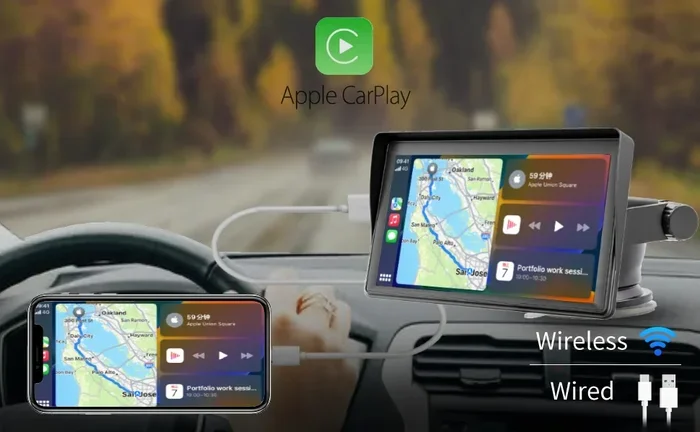
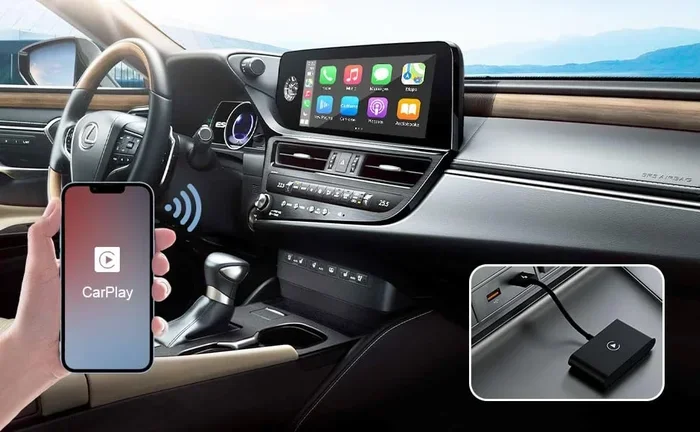
Wireless CarPlay is Apple’s technology that mirrors your iPhone’s interface onto your car’s infotainment screen. It works over a Wi-Fi connection instead of a USB cable. This means you get all the same features, but without the wire. You can use Siri, get directions, stream music, and reply to texts. All of this happens without taking your hands off the wheel.
Here is how it works in simple terms. Your iPhone connects to your car’s system using Bluetooth for the initial handshake. Then it switches to Wi-Fi for data transfer. This dual-connection approach keeps things fast and stable. The car screen shows your apps, notifications, and controls just like a wired connection would.
Wireless CarPlay vs Wired CarPlay
You might wonder what the difference really is. Wired CarPlay uses a Lightning or USB-C cable to connect your iPhone to the car. Wireless CarPlay uses Bluetooth and Wi-Fi. Both give you access to the same apps and features. The main difference is convenience. With wireless, you just get in the car and everything is ready. No cable hunting. No cable clutter.
There is one small trade-off. Wireless CarPlay can use slightly more battery on your iPhone. The Wi-Fi connection draws power. But most modern iPhones handle this just fine. If battery life is a big concern, you can plug in your phone while using wireless CarPlay. It gives you the best of both worlds.
Which Cars Support Wireless CarPlay?
Not every car supports wireless CarPlay. The feature depends on your car’s infotainment system. Most vehicles from 2019 onward offer wireless support. But even some older models can get it through software updates or aftermarket solutions.
Car Brands With Wireless CarPlay Support
Many popular car brands now include wireless CarPlay as standard or optional. Here are some of the most common ones:
- BMW – Most models from 2019 onward support wireless CarPlay.
- Ford – Many newer Ford vehicles offer wireless CarPlay.
- Honda – Select Honda and Acura models support it.
- Hyundai – Many 2020 and newer Hyundai models are compatible.
- Kia – Wireless CarPlay is available on most recent Kia models.
- Mercedes-Benz – Newer MBUX systems support wireless CarPlay.
- Tesla – Tesla does not support CarPlay natively, but adapters exist.
- Toyota – Some Toyota and Lexus models offer wireless support.
- Volkswagen – Many VW models from recent years are compatible.
Always check your car’s manual or the manufacturer’s website. The exact model year matters. A 2020 model might have wireless support while a 2018 version of the same car does not.
Can I Connect My iPhone to CarPlay Wirelessly? Here Is How to Set It Up
Setting up wireless CarPlay is straightforward. The process takes just a few minutes. Follow these steps and you will be up and running in no time.
Step 1: Check Your iPhone Compatibility
First, make sure your iPhone supports wireless CarPlay. Most iPhones from the iPhone 12 onward work with wireless CarPlay. Even some older models like the iPhone 11 can connect wirelessly if your car supports it. Go to Settings, then General, then CarPlay. If you see CarPlay options, your phone is compatible.
Step 2: Enable CarPlay on Your iPhone
Open Settings on your iPhone. Tap General. Then tap CarPlay. Make sure CarPlay is turned on. Your iPhone will start searching for available systems in your car. If your car is nearby and compatible, it should appear on the list.
Step 3: Connect Through Your Car’s Infotainment System
Start your car and go to the infotainment settings. Look for a CarPlay or Smartphone option. Select Wireless CarPlay if available. Your car screen will show a list of available iPhones. Tap on yours. Your iPhone will then ask you to confirm the connection. Tap Allow or Connect. That is it.
Step 4: Set Your Preferred Apps
Once connected, you can choose which apps appear on your car screen. Go to Settings on your iPhone, then CarPlay, then My Car. Here you can reorder apps and pick your favorites. Having the right apps set up makes your wireless CarPlay experience much better.
Common Wireless CarPlay Problems and How to Fix Them
Even with the best setup, things can go wrong. Wireless CarPlay connections are not always perfect. Here are the most common issues and how to solve them.
CarPlay Does Not Connect Automatically
If your iPhone does not connect to wireless CarPlay when you get in the car, try this first. Make sure Bluetooth and Wi-Fi are turned on. Go to Settings and check both. Also make sure CarPlay is enabled. Sometimes a simple toggle off and on fixes the issue. Restart your iPhone and try again. This solves the problem more often than you might think.
Connection Keeps Dropping
A dropping connection is frustrating. It usually happens because of Wi-Fi interference. Other devices in the car can cause this. Try moving your phone closer to the car’s antenna area. Usually that is near the center console. Also check if your car has a software update available. Car manufacturers often release updates that improve wireless CarPlay stability.
CarPlay Shows But Apps Do Not Work
Sometimes the CarPlay interface loads but apps do not respond. This can happen if your iPhone is low on storage. Free up some space on your phone and try again. Also make sure your apps are updated. Outdated apps can cause compatibility problems with wireless CarPlay.
Siri Does Not Work Wirelessly
Siri is a big part of the CarPlay experience. If Siri stops working, check your iPhone settings. Go to Settings, then Siri and Search. Make sure Listen for Hey Siri is turned on. Also check that Siri is enabled for CarPlay. A simple restart of both devices often brings Siri back.
How to Add Wireless CarPlay to Older Cars
What if your car does not support wireless CarPlay out of the box? You are not out of luck. There are ways to add this feature to older vehicles.
Wireless CarPlay Adapters
A wireless CarPlay adapter is a small device that plugs into your car’s USB port. It creates a bridge between your iPhone and the car’s system. The adapter handles the wireless connection. Popular brands like AAWireless and Carlinkit make reliable adapters. They cost between $50 and $200 depending on features.
These adapters are a great option for older cars. They give you the convenience of wireless CarPlay without replacing your entire infotainment system. Just plug the adapter in, pair your iPhone, and enjoy.
Aftermarket Head Units
For a more permanent solution, consider an aftermarket head unit. Companies like Pioneer, Sony, and Alpine make car stereos with built-in wireless CarPlay. This is a bigger investment. But it gives you a modern infotainment experience in any car. Installation can be done by a professional or a handy DIYer.
Tips to Get the Best Wireless CarPlay Experience
Want your wireless CarPlay to work flawlessly every time? Follow these practical tips. They make a real difference in daily use.
- Keep your iPhone updated. Apple releases iOS updates that improve CarPlay performance. Install them as soon as they are available.
- Update your car firmware. Check with your dealer or the manufacturer’s app for infotainment updates.
- Restart both devices regularly. A quick restart clears temporary glitches that can affect wireless CarPlay.
- Use a dedicated Wi-Fi network. Some cars create a separate Wi-Fi network for CarPlay. This reduces interference from other devices.
- Keep your iPhone charged. Wireless CarPlay uses more battery. Plugging in your phone helps maintain long drives.
- Limit background apps. Too many open apps can slow down CarPlay. Close apps you are not using.
- Reset network settings if needed. Go to Settings, General, Transfer or Reset iPhone, then Reset Network Settings. This fixes many stubborn connection issues.
Expert Insights on Wireless CarPlay
Automotive tech experts agree that wireless CarPlay is the future. Most new cars now include it as a standard feature. The convenience factor is huge. Drivers no longer need to deal with cables. The connection is seamless and automatic.
Experts also recommend checking your car’s manual before purchasing. Not all trim levels of the same car support wireless CarPlay. The base model might only have wired CarPlay. The higher trim levels usually include wireless support. This is an important detail to check when buying a used car too.
Another expert tip is to be patient during the first connection. Wireless CarPlay can take a few extra seconds to pair compared to wired. Once paired, the connection is fast and reliable. Give it a few uses to get comfortable with the timing.
Is Wireless CarPlay Safe?
Safety is always a top concern when using technology while driving. Wireless CarPlay is designed with safety in mind. Apple built in features that limit distractions. When your car is in motion, certain apps are restricted. You cannot type messages or browse the web freely. Siri handles most interactions through voice commands.
The wireless connection itself is very stable. It does not interfere with your car’s safety systems. In fact, having navigation and music through CarPlay can reduce the need to pick up your phone. This makes the road safer for everyone. Just remember, no technology replaces good driving habits. Keep your eyes on the road and your hands on the wheel.
Frequently Asked Questions
Can all iPhones connect to CarPlay wirelessly?
Most iPhones from the iPhone 12 onward support wireless CarPlay. Some older models like the iPhone 11 may also work, but it depends on your car’s system. Check your car’s manual to confirm wireless CarPlay support. If your car only supports wired CarPlay, an adapter can help bridge the gap.
Do I need any extra equipment for wireless CarPlay?
If your car already supports wireless CarPlay, you need nothing extra. Just make sure your iPhone is updated and CarPlay is enabled. For older cars, a wireless CarPlay adapter is a great option. These small devices plug into your car’s USB port and add wireless capability.
Why does my wireless CarPlay keep disconnecting?
Disconnections usually happen due to Wi-Fi interference or outdated software. Try restarting both your iPhone and your car’s infotainment system. Make sure both devices have the latest updates. If the problem persists, resetting network settings on your iPhone often fixes the issue.
Does wireless CarPlay drain my iPhone battery faster?
Yes, wireless CarPlay uses slightly more battery than wired. The Wi-Fi connection consumes power. However, most modern iPhones handle this well. If you are worried about battery life, plug your phone into a charger while using wireless CarPlay. This keeps your battery level stable during long drives.
Can I use wireless CarPlay with Android Auto at the same time?
No, CarPlay and Android Auto are separate systems. Your car will only support one at a time. If your car supports wireless CarPlay, it will not run Android Auto wirelessly. Some cars let you switch between the two, but not simultaneously. Check your car’s manual for specific details.
What should I do if wireless CarPlay is not showing up on my car screen?
First, make sure Bluetooth and Wi-Fi are turned on. Restart your iPhone and your car’s system. Check that CarPlay is enabled in your iPhone settings. If it still does not appear, try resetting network settings on your iPhone. A factory reset of the car’s infotainment system can also help in stubborn cases.
Conclusion
Can I Connect My iPhone to CarPlay Wirelessly? Absolutely. Wireless CarPlay is a game-changer for modern driving. It brings convenience, safety, and entertainment together in one seamless experience. As long as your car and iPhone are compatible, setting it up takes just a few minutes.
If your car does not support it natively, wireless adapters and aftermarket head units offer great solutions. Keep your devices updated, follow the troubleshooting tips, and your wireless CarPlay will work reliably. The days of cable clutter are over. Embrace the freedom of wireless CarPlay and enjoy a smarter, safer drive every time you hit the road.
Start with the setup steps in this guide. Test it on your next drive. Once you experience the convenience, you will wonder how you ever drove without it. Wireless CarPlay is not just a feature. It is a better way to drive.