Can I Use Apple CarPlay Wirelessly Without Any Cables
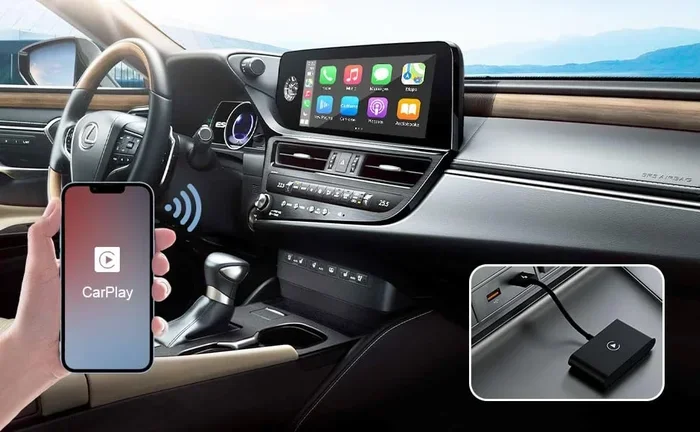
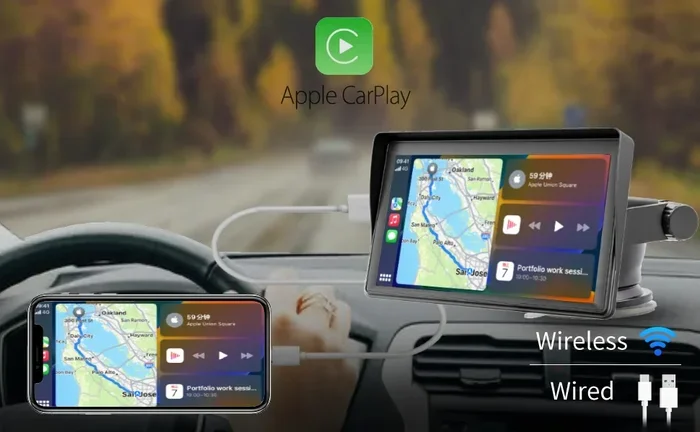
Yes, you can use Apple CarPlay wirelessly without any cables. Wireless Apple CarPlay lets you connect your iPhone to your car’s infotainment system using Bluetooth and Wi-Fi. This means no more fumbling with cables every time you get in the car. Many newer vehicles come with wireless CarPlay built in, and you can also add it to older cars using an adapter. Let us walk you through everything you need to know about going cable-free with Apple CarPlay.
Have you ever wondered if you can use Apple CarPlay wirelessly without plugging in a single cable? The short answer is yes. Wireless Apple CarPlay is real, and it is changing the way we interact with our cars. You no longer need to dig for a Lightning cable or worry about a tangled cord every time you start your engine.
Wireless CarPlay uses Bluetooth and Wi-Fi to connect your iPhone to your car’s infotainment system. This means you get all the same features, from navigation to music streaming, without a single wire. If you have been curious about making the switch, this guide covers everything you need to know. We will walk you through compatibility, setup, benefits, and troubleshooting so you can go fully cable-free with confidence.
The demand for wireless CarPlay has grown fast. Drivers want convenience, and car makers are listening. Today, many new vehicles come with wireless Apple CarPlay right out of the dealership. But what if your car does not support it yet? Do not worry. There are plenty of options to bring wireless connectivity to almost any vehicle. Let us dive into the details.
Key Takeaways
- Wireless Apple CarPlay exists: You can ditch the cable and connect your iPhone to your car using Bluetooth and Wi-Fi.
- Not all cars support it natively: Check your vehicle year, make, and model to see if it has built-in wireless CarPlay.
- Aftermarket adapters work great: You can add wireless CarPlay to older cars with a simple adapter device.
- Setup is straightforward: Pairing your iPhone wirelessly takes just a few minutes.
- Performance is nearly identical: Wireless CarPlay delivers the same features as wired with minimal lag.
- Troubleshooting is simple: Most connection issues have easy fixes you can do yourself.
- Wireless CarPlay is the future: More car manufacturers are adopting it as a standard feature.
📑 Table of Contents
What Is Wireless Apple CarPlay?
Wireless Apple CarPlay is a cable-free version of the popular Apple feature that mirrors your iPhone on your car’s screen. Instead of plugging your phone into a USB port, you connect through Bluetooth and Wi-Fi. Once paired, your car’s display shows your apps, calls, messages, and music just like a wired connection would.
How Wireless CarPlay Works
Wireless Apple CarPlay uses two wireless technologies. Bluetooth handles the initial pairing and audio streaming. Wi-Fi takes care of the heavy lifting, like loading maps and streaming music. Together, these two connections create a seamless experience that feels almost identical to using a cable.
The process is simple. Your iPhone communicates with your car’s head unit over Wi-Fi Direct. This creates a private network between your phone and your car. No internet connection is needed for the core features. You get navigation, voice control, and app access just as you would with a wired setup.
Wireless vs Wired CarPlay
You might wonder if there is any real difference between wireless CarPlay and the traditional wired version. The truth is, both deliver the same core experience. You get Siri integration, messaging, music apps, and navigation. The main difference is the lack of a physical cable.
Here is a quick comparison of the two:
- Wired CarPlay: Uses a Lightning or USB-C cable. Connection is instant and very stable. No setup needed beyond plugging in.
- Wireless CarPlay: Uses Bluetooth and Wi-Fi. Requires one-time pairing. Offers the same features without any cables.
- Connection Stability: Wired is slightly more stable. Wireless has improved a lot but can occasionally drop.
- Convenience: Wireless wins here. No cables means no clutter and no fumbling in the dark.
- Charging: Wired CarPlay charges your phone. Wireless does not, so you may need a separate charger.
Most drivers find that the convenience of wireless Apple CarPlay far outweighs the minor stability difference. For everyday use, wireless works beautifully.
Which Cars Support Wireless Apple CarPlay?
Not every car on the road supports wireless CarPlay yet. But the list of compatible vehicles grows every year. Knowing whether your car qualifies is the first step toward going cable-free.
Factory-Installed Wireless CarPlay
Many automakers now offer wireless Apple CarPlay as a standard or optional feature in their newer models. Brands like BMW, Mercedes-Benz, Toyota, Honda, Ford, and Hyundai have embraced wireless CarPlay in many of their 2022 and newer vehicles. Some luxury brands have offered it for even longer.
Here are some general guidelines for finding factory wireless support:
- 2022 and newer models: Many brands now include wireless CarPlay as standard.
- 2019 to 2021 models: Wireless CarPlay is often available as an optional upgrade.
- 2018 and older: Wired CarPlay is common, but wireless support is rare.
The best way to check is to look at your car’s manual or visit the manufacturer’s website. You can also ask your dealer. They will know exactly whether your specific trim level supports wireless Apple CarPlay.
Aftermarket Wireless CarPlay Solutions
What if your car does not have wireless CarPlay built in? You are not out of luck. Aftermarket solutions make it possible to add wireless connectivity to almost any vehicle with a compatible infotainment system.
Here are the most popular options:
- Wireless CarPlay Adapters: Small devices that plug into your car’s USB port and create a wireless bridge. Brands like Carlinkit and Belkin make reliable options.
- Aftermarket Head Units: You can replace your entire infotainment system with one that supports wireless CarPlay out of the box.
- Bluetooth CarPlay Modules: These modules install behind your dashboard and add wireless capability to your existing system.
Wireless CarPlay adapters are the most popular choice. They are affordable, easy to install, and work with most cars that already have wired CarPlay. Prices typically range from 50 to 150 dollars, making this a budget-friendly upgrade.
How to Set Up Wireless Apple CarPlay
Setting up wireless Apple CarPlay is easier than you might think. The process takes just a few minutes, and you will be connected in no time. Here is how to do it step by step.
Step-by-Step Setup Guide
Follow these steps to get wireless CarPlay running on your iPhone and car:
- Make sure your iPhone is updated: Wireless CarPlay requires iOS 12 or later. Update your iPhone to the latest version for the best experience.
- Turn on Bluetooth and Wi-Fi: Go to Settings and make sure both Bluetooth and Wi-Fi are enabled on your iPhone.
- Turn on your car’s infotainment system: Start your car and access the infotainment menu.
- Select Apple CarPlay: Choose the CarPlay option from your car’s menu. If your car supports wireless, it should appear as a wireless option.
- Pair your iPhone: Your car will display a pairing request on its screen. Accept it on both your car and your iPhone.
- Confirm the connection: Once paired, your iPhone screen should mirror on your car’s display automatically.
That is it. You are now using Apple CarPlay wirelessly. The next time you get in your car, it should connect automatically as long as Bluetooth and Wi-Fi are on.
Common Setup Issues and Fixes
Sometimes wireless CarPlay does not connect right away. Here are common issues and quick fixes:
- Car does not detect iPhone: Restart both your iPhone and your car’s infotainment system. Turn Bluetooth off and back on.
- Connection keeps dropping: Make sure your iPhone is not in Low Power Mode. This can interfere with wireless CarPlay connectivity.
- Audio cuts out: Check that your car’s audio settings are set to CarPlay, not Bluetooth or radio.
- Maps load slowly: Wireless CarPlay relies on Wi-Fi for map data. Make sure you have a strong Wi-Fi signal or download maps for offline use.
Most issues resolve with a simple restart or by toggling Bluetooth and Wi-Fi off and on again. Patience goes a long way with wireless connections.
Benefits of Going Wireless with Apple CarPlay
Switching to wireless Apple CarPlay brings several real advantages. It is not just about avoiding cables, though that alone is worth it for many drivers.
Convenience and Safety
The biggest benefit of wireless CarPlay is convenience. You never have to unplug or plug in a cable again. Just get in your car, and your phone connects automatically. This small change adds up to a much smoother daily routine.
From a safety standpoint, wireless Apple CarPlay reduces distractions. No cables means no reaching for a port in a tight space. You keep your hands on the wheel and your eyes on the road. Voice commands through Siri work seamlessly with wireless connections too.
Does Wireless CarPlay Affect Performance?
A common concern is whether wireless CarPlay delivers the same performance as wired. The answer is mostly yes. For music streaming, podcasts, and hands-free calls, wireless performs just as well. Navigation apps like Google Maps and Waze work smoothly over the Wi-Fi connection.
There can be a slight delay when loading complex map views, but it is barely noticeable in real-world driving. For most people, the difference between wired and wireless CarPlay is negligible. The convenience far outweighs any minor performance trade-off.
Wireless Apple CarPlay Troubleshooting
Even the best wireless CarPlay setups can occasionally have hiccups. Knowing how to troubleshoot common problems saves time and frustration.
Connection Drops and Lag
If your wireless CarPlay connection drops frequently, try these steps:
- Forget the device and re-pair: On your iPhone, go to Settings, then General, then CarPlay. Remove your car and set it up again.
- Restart your iPhone: A simple restart often fixes temporary software glitches that cause connection issues.
- Update your car’s firmware: Many manufacturers release updates that improve wireless CarPlay performance. Check with your dealer.
- Reduce Wi-Fi interference: Other devices can sometimes interfere with the Wi-Fi Direct connection. Turn off unnecessary Bluetooth devices nearby.
When to See a Professional
Most wireless CarPlay problems have simple fixes. But if you have tried everything and the connection still fails, it may be time to seek professional help. A car audio specialist can diagnose hardware issues with your infotainment system or your wireless adapter.
If you installed an aftermarket wireless CarPlay adapter and it is not working correctly, the installer can check the wiring and positioning. Sometimes a simple repositioning of the adapter solves the problem.
Is Wireless Apple CarPlay Worth It?
The short answer is yes. Wireless Apple CarPlay offers a cleaner, more convenient driving experience. You get all the features you love without the hassle of cables. Whether your car supports it natively or you add it through an adapter, the upgrade is well worth it.
Think about your daily routine. How many times have you plugged and unplugged your cable? How many times has the connection failed because of a loose wire? Going wireless eliminates all of that. It is one of those small upgrades that makes a big difference in your daily driving experience.
As more car manufacturers adopt wireless CarPlay as a standard feature, the technology will only get better. Future updates will bring faster connections, lower latency, and even more seamless integration. If you are in the market for a new car, wireless Apple CarPlay should be high on your checklist.
For those with older vehicles, aftermarket adapters make wireless connectivity accessible and affordable. You do not need to buy a new car to enjoy the benefits of cable-free CarPlay. A simple adapter can transform your driving experience in under an hour.
The bottom line is clear. Apple CarPlay wireless is practical, reliable, and increasingly available. Whether you are a tech enthusiast or just someone who wants a cleaner dashboard, wireless CarPlay delivers. Make the switch today and never look back.
Frequently Asked Questions
Can I use Apple CarPlay wirelessly on any car?
Not every car supports wireless Apple CarPlay natively. However, you can add wireless CarPlay to most vehicles using an aftermarket adapter or by upgrading your head unit. Check your car’s compatibility first to see if it already has built-in wireless support.
Does wireless CarPlay charge my iPhone?
No, wireless CarPlay does not charge your iPhone. The wired version uses the USB connection to power your phone. If you need to charge while using wireless CarPlay, consider using a separate wireless charging pad or a dash-mounted charger.
Is wireless CarPlay slower than wired CarPlay?
The difference is minimal for most everyday tasks. Music streaming, calls, and basic navigation work just as well with wireless Apple CarPlay. You might notice a slight delay when loading detailed map views, but it is barely noticeable while driving.
What do I need for wireless Apple CarPlay?
You need an iPhone that supports CarPlay (iPhone 12 or later is ideal), a car or aftermarket system that supports wireless CarPlay, and a stable Bluetooth and Wi-Fi connection. If your car only has wired CarPlay, a wireless adapter can bridge the gap.
Can I use wireless CarPlay with Android Auto at the same time?
No, Apple CarPlay and Android Auto are separate systems. Your car can only display one at a time. If your vehicle supports both wireless options, you can switch between them in your infotainment settings, but not use them simultaneously.
How do I disconnect wireless Apple CarPlay?
You can disconnect wireless CarPlay by going to Settings on your iPhone, selecting General, then CarPlay, and choosing your car. You can also turn off Bluetooth or Wi-Fi on your iPhone. Your car will remember the pairing, so it reconnects automatically next time.
=== CONCLUSION ===
Apple CarPlay wireless is no longer a luxury feature. It is a practical, everyday convenience that makes driving safer and more enjoyable. Whether your car has it built in or you add it with an adapter, going cable-free is a smart move. The setup is simple, the performance is excellent, and the convenience is hard to beat.
Now that you know the answer to “Can I use Apple CarPlay wirelessly without any cables,” you are ready to make the switch. Check your car’s compatibility, grab an adapter if needed, and enjoy the freedom of a completely wireless driving experience. Your dashboard, your phone, and your sanity will all thank you.